
This time last year, the Analytics team at Pearl was a strong team of two. We didn't manage a formal "on-call rotation" because we generally knew who was going to look into which issues and who was going to respond to which stakeholders. When something fell in the middle, we just asked each other.
We've more than doubled the team over the past year, and are now a team of five. As we've grown, the informal model stopped scaling. Around the same time, the AI tooling available to us got dramatically better. Those two trends collided in a useful way: the structure we needed to build anyway (formal rotations, documented runbooks, clearer accountability) turned out to be exactly the kind of structure that AI could amplify.
Today, our on-call analyst context-switches between investigating and triaging alerts in a dedicated Slack channel, reviewing open PRs in GitHub, and fielding ad-hoc questions from stakeholders. Until recently, the institutional knowledge of "what to do when X breaks" lived in people's heads, scattered Slack threads, and incomplete runbooks. We couldn't roll out a formal on-call rotation against that foundation; we'd be leaving our newest team members in the dark, forcing them to send messages like "Hey, issue X happened, I saw you were the last one to solve it. What did you do?"
A proper Confluence runbook fixed the "where is the knowledge written down" problem, but it didn't reduce the cognitive load of the role. The on-call analyst still had to monitor several queues across several platforms every day and mentally stitch them together.
The Solution: A Claude Project as On-Call Command Center
Pearl rolled out Claude Enterprise in January 2026, and we've been steadily adding integrations (Slack, GitHub, ClickUp, Confluence) so that Claude can act as a single point of entry across our systems. Claude has the concept of a Project. A persistent bundle of instructions and integrations that can be shared across a team. The integrations are the easy part. The Instructions field is what makes the Project actually useful.
Instead of having the analyst look through a runbook and check each queue/channel/etc, what if we provided the runbook to Claude and had it scan each location and surface a synthesis of where the on-call person needs to investigate? Turns out, this is exactly what Claude Projects are great at doing. This would reduce cognitive load (simply asking, “Tell me where to look” vs. scraping each location yourself) and could provide the first level of triage (e.g. “This issue has come up in the past, and this was the resolution”).
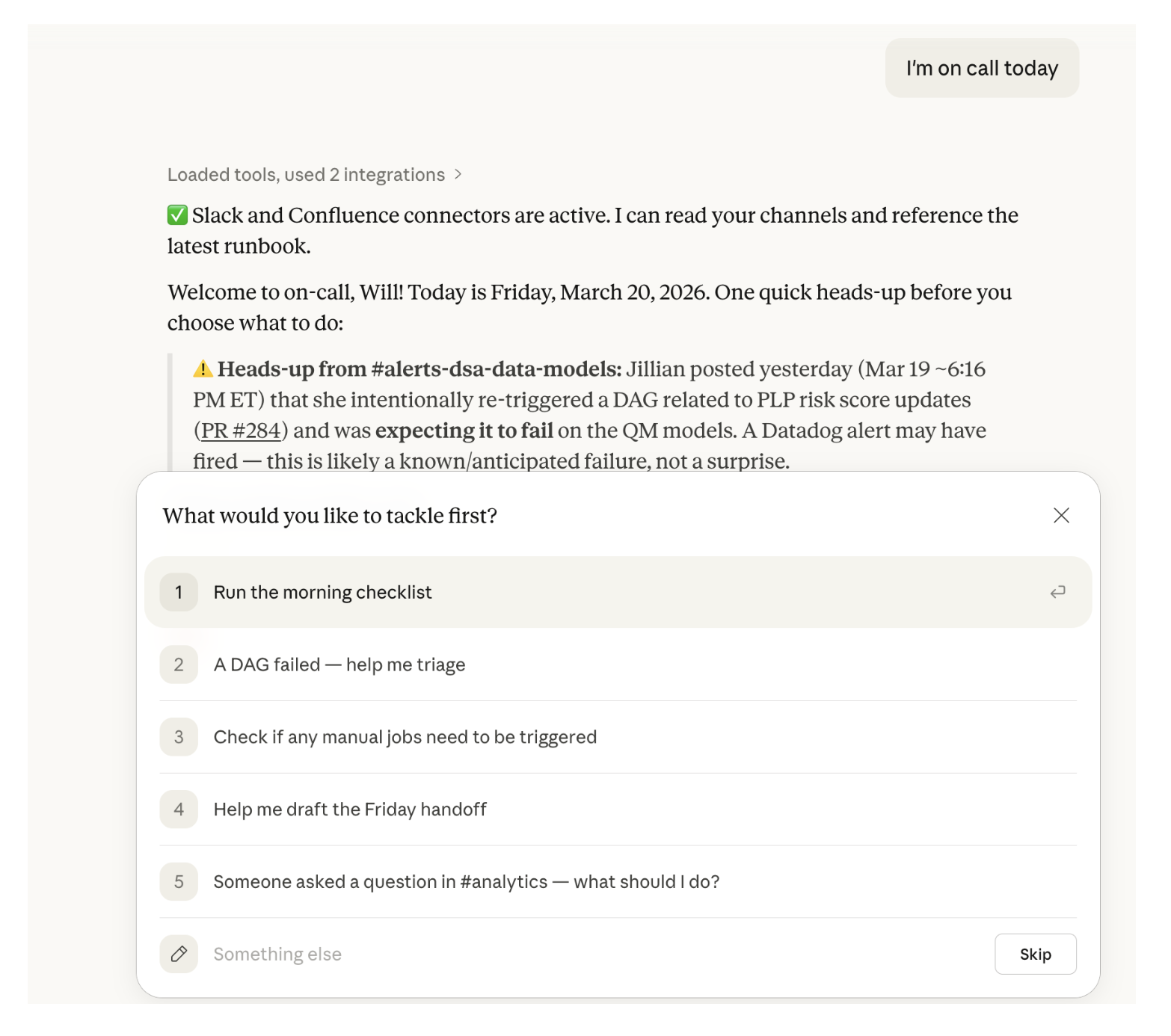
The Key Unlock: The Instructions Section
The integrations are what let Claude reach our systems. The Instructions field is what gives it judgment about what to do once it gets there. Think of it as a standing brief Claude re-reads at the top of every conversation in the Project. It’s the kind of thing you'd otherwise have to re-explain to a new analyst every Monday morning, except written down once.
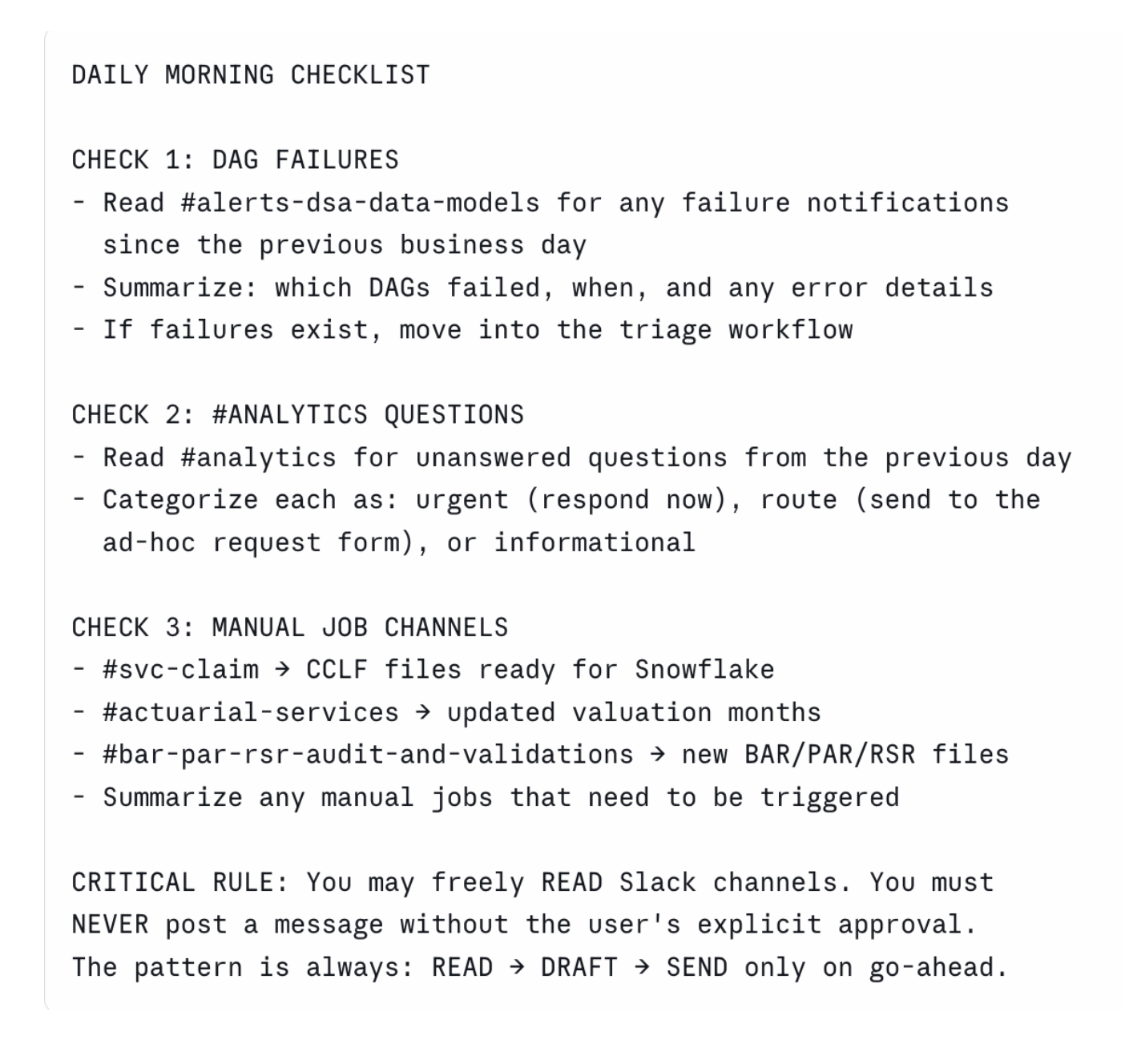
The rest of the Instructions field handles triage workflows, escalation paths, and message templates the same way. When Claude gets something wrong, we don't retrain anything; we ask why it responded that way and add a few lines to the Instructions. Here's a real example. When Claude couldn't reach Slack, it would skip those checks and still report success, even though most of the checks lived there. The snippet below shows the lines we added to handle missing integrations.

What's working
We used Claude itself to build out the project instructions (more on this in a bit). Because the project reads directly from our Confluence runbook, any update to the runbook is automatically picked up; we don't have to remember to sync a static copy.
The practical impact has been roughly a 50% reduction in on-call effort, but the bigger win is onboarding. Our newest data analyst joined the on-call rotation roughly a month sooner than we'd otherwise have been comfortable with. The Claude Project gave us, and her, confidence that she'd know what was expected, where to look, and how to start troubleshooting.
What we're still figuring out
The Claude Project didn't solve everything overnight:
- GitHub integration is less seamless than we'd hoped: the connector can read code from a specific repo, but can't surface open PRs or route review requests to a team, so the on-call analyst still checks PRs manually.
- Slack retrieval occasionally surfaces conversations that are stale or off-topic, so responses still need a human review pass.
- Prompt quality matters. The project works best when analysts ask specific questions ("what broke overnight?") rather than open-ended ones.
We expect most of these rough edges to smooth out as the underlying models improve and as we refine the instructions.
What's next
We've only scratched the surface of what's possible with an AI on-call partner. A few directions we're exploring:
- Moving from Tier 0 to Tier 1 support: having Claude engage with stakeholders directly and proactively address certain alerts, not just tee them up for a human.
- Graduating from a Project to a more agentic workflow: giving the system more autonomy to run diagnostics, open investigation threads, and propose fixes, with human checkpoints at the decision points that matter.
- Building complementary Projects for adjacent workflows: stakeholder intake and ad-hoc data request triage.
We've also been deliberately pragmatic about model selection. The right model for this project today may not be the right one in six months, and we want to stay flexible enough to follow the frontier without rebuilding from scratch every time something new ships.
Try it at home!
This entire setup took less than an hour to build, because we used Claude itself to develop the project instructions. If you want to try this yourself, a few things that helped us:
- Start from a runbook, not a blank Instructions field. Point Claude at an existing doc and have it draft the structure. Editing is faster than writing.
- Pick one workflow with clear failure modes. On-call works as a first project because the inputs (alerts, channels, runbook) and the failure modes (DAG breaks, stale data, missed alerts) are concrete.
- Treat misbehavior as the prompt. When Claude does the wrong thing, ask it why before you change anything. Its explanation is usually the first draft of the fix.
- Keep humans in the loop on outbound actions. Our Instructions explicitly forbid Claude from posting to Slack without confirmation. That single constraint prevents a whole class of embarrassing failures.
Want to join us?
This is one of many problems we're actively solving at Pearl with AI. We're looking for candidates who are excited to push AI further into the analytics workflow, not as a novelty but as a core part of how the team operates. If that sounds like you, and you want to make a difference in U.S. health care, come work for us. We're actively hiring for multiple roles, and we'd love to meet you.

Pearl Health is powering the future of healthcare
We’re a team of physicians, technologists, and risk-bearing experts with a passion for enabling our partners to deliver better care and reduce health system costs. Want to learn more?
